Webflow SEO services

We provide SEO services for Webflow sites - from landing pages and agency portfolios to corporate websites and ecommerce projects. The platform delivers clean semantic code and high speed out of the box, but proper SEO calls for the right approach to structure, content, and links.

Webflow is technically one of the best options for SEO - but without a proper strategy the technical edge doesn't convert into traffic

We break down your project, the plan, the state of CMS Collections, and the competitive field - then build a growth strategy with concrete stages.

What makes Webflow different from other platforms for SEO

Webflow isn't a classic CMS and it isn't a drag-and-drop builder. It's a visual editor that generates real HTML/CSS code running on proprietary hosting. That creates a unique mix of advantages and limits you have to work with the right way.

Understanding these 8 points gives you the foundation for the right SEO strategy - Webflow's technical advantages only pay off with a systematic approach.

/ Technical foundation
Webflow outputs clean semantic HTML

Unlike builders that wrap content in heavy JavaScript, Webflow outputs proper HTML/CSS code. Semantic tags, proper heading structure, valid markup - all of that works in favor of SEO out of the box. But this is just the foundation - without a strategy, even perfect code won't pull traffic on its own.

/ Hosting
Proprietary infrastructure built on Cloudflare Enterprise

Webflow Hosting is a proprietary solution on Cloudflare Enterprise, with SSL, CDN, and automatic caching. The site runs fast out of the box, which helps Core Web Vitals. The flip side is the lack of flexibility: you can't migrate to another host without rebuilding the whole site, and you can't configure server-side redirects outside the admin panel.

/ CMS Collections
Proprietary dynamic content system with hard limits

Webflow CMS Collections lets you create dynamic templates - blog, portfolio, product catalog. But the limits are hard: 100 items on the starter plan, 10,000 on the business plan. For projects with a big catalog that's a critical constraint. Separately - the reference structure between collections for organizing internal linking is non-trivial.

/ Custom code
Ability to roll out SEO extensions via JavaScript

Webflow lets you inject custom code into <head>, <body>, or before the closing </body>. Through that we add complex Schema.org markup, custom analytics, A/B tests, dynamic meta tags. This closes the gap between the platform's baseline and advanced SEO tasks - but it takes development hours.

/ URL structure
Clean URLs without prefixes or parameters

Unlike Shopify with its mandatory /products/, Webflow gives you full control over URL structure. You can build clean paths like /uk/services/seo-audit instead of /pages/services/seo-audit. At the same time it creates risk - mistakes in URL structure are hard to fix later without bulk redirects.

/ Webflow Localization
Official multilingual feature with its own limits

Webflow Localization is a relatively new product for multilingual sites. It supports hreflang, separate URLs per language, and CMS Collections translation. But it's a paid feature with constraints: not every content type is translatable, and localizing a complex CMS is harder. For many projects, separate country domains end up more economical.

/ Designer vs Editor
Two roles with different rights and responsibilities

Webflow has two separate roles - Designer (full access to code, styles, structure) and Editor (limited content edits). That makes it safe to hand off article and product updates to the client without risking the design. SEO tasks mostly happen in Designer, while ongoing content management lives in Editor.

/ Symbols and Style Guide
System components for scalable SEO

Webflow Symbols are reusable elements that update across every page where they live the moment you change them. That affects SEO globally - for example, an update to a footer SEO block rolls out across the whole site instantly. Without a proper symbol architecture, a big project becomes unmanageable.

The D&Team approach

How we work with Webflow projects

Webflow calls for a different SEO approach than classic CMS. The platform is technically strong but limited in flexibility on certain settings. Our job is to leverage its strengths and work around its limits.

/01/
We understand the Webflow platform architecture
We know how CMS Collections, Symbols, Style Guide, and custom code work. We understand the platform's limits (CMS caps, lack of server-side redirects) and know how to work around them. We don't try to use Webflow as if it were WordPress - we work with it on its own terms.
/02/
We work with Webflow Localization and custom code
We have hands-on experience rolling out multilingual sites through Webflow Localization, configuring hreflang and geo targeting. Through custom code injection we add what Webflow doesn't give out of the box - complex Schema.org markup, dynamic meta tags, integrations with external SEO tools.
/03/
Initial check that accounts for Webflow specifics
A standard SEO audit won't surface the unique problems on Webflow. We check the CMS Collections architecture, 301 redirect setup through Webflow Admin, Localization configuration, presence of custom code, and the current plan's limits. We run a full audit on 80+ parameters relevant specifically to Webflow.

Who our Webflow SEO services are a good fit for

Webflow suits a wide range of businesses, but not every Webflow site will get the most out of our work. Here are the situations where our SEO services deliver the biggest impact.

Agencies, design studios, and freelancers who built their portfolio on Webflow and want organic traffic to bring in new clients
SaaS and tech startups with a Webflow site that acquire users through ads and want to add an organic channel
B2B companies that migrated from WordPress to Webflow for the design and lost part of their rankings after the move
Webflow Ecommerce stores with a small catalog and a high average order value that need quality local and niche SEO
Brands with a multilingual Webflow site through Localization that run into cannibalization or indexing issues on specific language versions
Corporate sites with a large CMS Collection (blog, case studies, services) on the business plan that need systematic content work

When SEO for Webflow won't justify the investment

An honest read on situations where our work won't deliver the growth expected - or where the problem runs deeper than SEO and needs another solution.

Webflow Ecommerce store with 1,000+ products - the platform technically isn't a fit for large ecommerce, a move to Shopify is worth considering
Owner on the Webflow starter plan with a 100 CMS items cap - serious content marketing absolutely requires an upgrade to the business plan
Site was launched recently and the baseline conversion funnel isn't set up yet - there's nowhere for SEO traffic to lead
Business in a competitive niche (legal, insurance, real estate) on a small budget - organic competition with well-funded players takes serious investment regardless of platform
Expecting results in 2 months - Webflow sites typically show the first noticeable shifts around month 4-6
Owner not willing to invest in custom code for advanced SEO tasks - some optimizations (complex Schema.org, dynamic meta tags) will go unaddressed
Site is just static pages with no CMS Collections - the platform isn't being used to its full potential for systematic content marketing
Owner is considering a move from Webflow to another platform in the coming months - SEO investments in the current platform will partially lose their value

Working areas of SEO for a Webflow site

A breakdown of specific work we deliver within the platform. Each area is tied to Webflow's capabilities and your commercial goals.
/01/
Initial project and architecture review
  • plan and available SEO capabilities assessment
  • analysis of CMS Collections and Symbols structure
  • checking for custom code in head and body
  • speed and Core Web Vitals assessment
  • prioritized work plan
/02/
Meta tags and schema setup via Webflow SEO
  • title and description setup through the admin panel
  • dynamic meta tag templates for CMS Collections
  • baseline Schema.org Organization, Article, Product rollout
  • Open Graph and Twitter Card configuration
/03/
Custom code work through head/body injection
  • rolling out extended Schema.org for complex types
  • dynamic canonical setup via JavaScript
  • Google Tag Manager and conversion tracking integration
  • custom events for Search Console
/04/
Keyword research and clustering
  • commercial and informational queries by topic
  • mapping between service pages, products, and CMS Collections
  • long-tail discovery for the blog
  • niche seasonality and trend analysis
  • a query-to-page mapping matrix
/05/
Webflow Localization setup for multilingual sites
  • building a hreflang matrix through Localization
  • removing duplicates between language versions
  • geo targeting through Search Console
  • unique content for each market
/06/
Working with CMS Collections and dynamic pages
  • dynamic page template optimization
  • unique meta tags through Webflow variables
  • proper URL structure for CMS items
  • reference architecture between collections for internal linking
/07/
Page load speed and Core Web Vitals
  • image optimization through Webflow Asset Manager
  • analysis and removal of unnecessary animations and interactions
  • work on fonts and custom code overhead
  • hitting the green Core Web Vitals zone
/08/
Content marketing through Webflow Blog
  • content plan tied to informational queries in your niche
  • SEO articles that drive readers to key pages and services
  • refreshing older posts
  • internal linking via Symbols and references between collections
/09/
Link building for Webflow projects
  • competitor backlink profile analysis
  • outreach strategy tailored to design agencies, SaaS, and B2B
  • guest posts and expert publications
  • monitoring anchor distribution and donor quality
/10/
Analytics and reporting
  • GA4 setup with conversion tracking
  • Search Console for every language version
  • a rankings dashboard updated weekly
  • a monthly report on the actual results

How work on a Webflow project unfolds

Each stage builds on the result of the previous one. Without a platform diagnostic there's no proper strategy, and without a strategy technical fixes won't produce a cumulative effect.

7 stages from the first meeting to systematic results in traffic, leads, and sales.

/01
/02
/03
/04
/05
/06
/07
/01
/ First contact and project discussion

First meeting - we walk through your goals, the project type (agency portfolio, SaaS, corporate site, store), current customer acquisition channels, geography, and niche. SEO without business context turns into technical work for technical work's sake.

/02
/ Plan and site architecture review

Before running the full audit, we check: which Webflow plan, how many CMS items are in use, whether Webflow Localization is active, how much custom code lives in head/body, how Symbols are organized. This step gives a realistic read on the available SEO levers.

/03
/ Technical SEO audit of the platform

A full audit accounting for Webflow specifics: meta tag setup via admin, the state of CMS Collections, language versions through Localization, speed, presence of extended Schema.org through custom code. The output is a report with prioritized tasks and a forecast for each.

/04
/ Drafting the SEO roadmap

Based on the audit and the semantic core, we shape the growth strategy. We align with you: whether to upgrade the plan to expand CMS, whether to lean into custom code, how to organize CMS Collections for content marketing, what sequence of work to follow over the next 3 months.

/05
/ Fixing technical blockers of growth

The first 4-6 weeks are about closing what's blocking growth: meta tag setup through Webflow SEO, URL structure fixes, baseline speed optimization, Localization setup, Schema.org rollout through custom code.

/06
/ Content cycles and link equity work

We launch the systematic work: SEO copy for key pages, rewriting CMS Collections items, regular blog articles, link building through outreach. This stage runs continuously and brings the bulk of the traffic gains.

/07
/ Regular reporting and plan adjustments

Each month - a report on actual results with the plan for the next period. Once a quarter - a strategy meeting where we revisit the bigger calls: is the CMS architecture still right, do we add new language versions through Localization, what to add to the scope.

What you get from Webflow SEO services

As a result of SEO services, your Webflow site becomes a fast, technically sound, and well-structured traffic acquisition tool.

You get a site that takes full advantage of Webflow and doesn't suffer from the platform's typical pitfalls.

01
CMS Collections architecture organized for SEO tasks
02
Extended Schema.org implemented through custom code
03
Site speed in the green zone of Core Web Vitals
04
Language versions through Localization with proper hreflang
05
Steady growth in organic visits and leads
Our pricing

SEO service
pricing plans

Our pricing plans are based on a simple and transparent model: every client receives the same high level of SEO services, and the only difference between plans is the number of hours our team can dedicate to your project each month.

You choose the scope that matches your goals and growth pace

/01/ SEO Starter
Suitable for small projects and corporate websites
/02/ SEO Growth
Ideal solution for mid-size online stores and corporate websites
/03/ SEO Pro
For large online stores, SaaS platforms, and large content portals
SEO Starter
20 hours / 25$
500$/mo
This plan includes:
Small project (landing page, corporate site, small business)
Basic initial technical SEO audit + quarterly checks
Keyword research up to 100 keywords + basic content strategy
On-page optimization of priority pages
Basic linkbuilding (guest posts)
Rank tracking for TOP-50 keywords
Google Analytics 4: setup + monthly analytics
Communication via chat + monthly report
Suitable for landing pages, corporate websites, and small businesses that require basic SEO optimization and systematic work on organic growth. The team conducts an audit, optimizes key pages, works on technical factors, and builds a foundation for stable website development. The package budget covers team work only. Link placement costs, copywriting, and other expenses are paid separately by the client for full transparency.
SEO Growth
40 hours / 25$
1000$/mo
This plan includes:
Corporate site or online store
Full technical SEO audit + monthly technical monitoring
Keyword research up to 500 keywords + topic clusters + detailed content strategy
Full on-page optimization + template-based optimization
Linkbuilding: guest posts + niche edits + crowd + analysis of 3 competitors
Rank tracking up to 500 keywords + competitor comparison
Google Analytics 4 + comparative analytics across periods
Communication via chat + monthly report + 1 Meet call per month
This plan is designed for mid-size online stores and corporate websites that require consistent SEO work. The team focuses on technical optimization, site structure, content development, and link building to drive steady growth in organic traffic and sales. The package budget covers team work only. Link placement costs, copywriting, and other expenses are paid separately by the client for full transparency.
SEO Pro
70 hours / 25$
1750$/mo
This plan includes:
E-commerce, SaaS or highly competitive niche
Extended technical SEO audit + monthly monitoring + competitor analysis
Unlimited keyword research + pillar pages + full content roadmap
On-page + template automation + AI-friendly markup
Linkbuilding: tier-1 outreach + competitive link-gap for 5+ competitors
Unlimited rank tracking
Google Analytics 4 + custom events and conversions
Communication via chat + 2 Meet calls per month + quarterly strategy
This plan is designed for large online stores, SaaS platforms, and content-driven websites in competitive markets. Our team implements a full-scale SEO strategy including technical optimization, site structure development, content growth, link building, and analytics to drive sustainable traffic and business growth. The package budget covers team work only. Link placement costs, copywriting, and other expenses are paid separately by the client for full transparency.

Want to get the most out of Webflow in organic search?

Leave a request and we'll set up a free intro meeting. We'll look at your Webflow site in search together, discuss your business goals, and outline the most realistic growth directions we can see from the initial review. If organic search isn't the right channel for your situation - we'll say so straight up.


The intro consultation is always free. We only move into engagement when both sides see the point.

Our case studies

Our team combines expertise, strategy, and AI technology so every project delivers a predictable result.
/01/
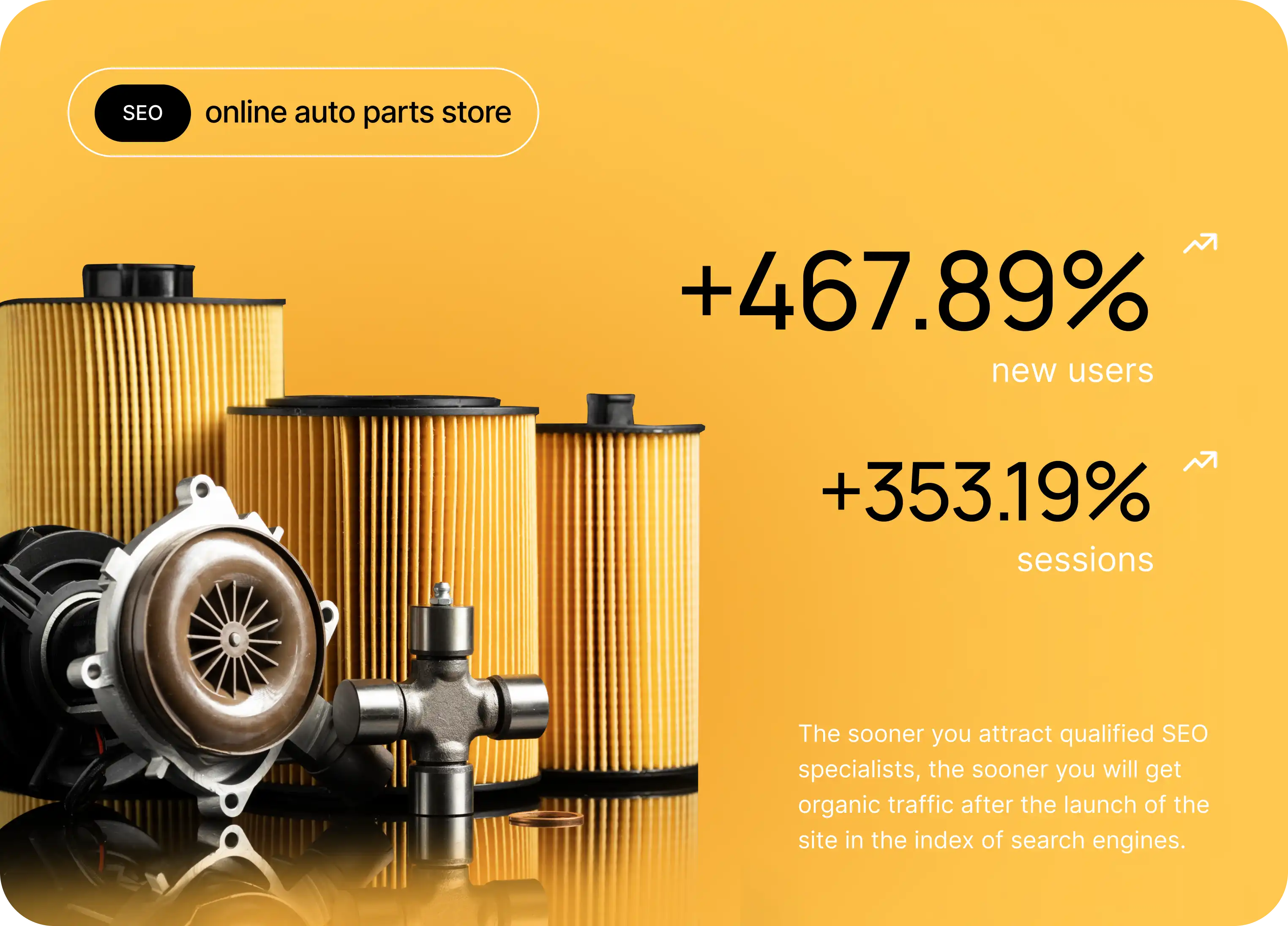
E-commerce SEO Case Study: Auto Parts Store
Auto Parts
Auto Parts
Auto parts store SEO case study: how a smart site structure, a strong semantic core, and step-by-step optimization of hundreds of thousands of pages delivered steady organic traffic.
Case details
/02/
SEO for IT Companies: Case Study
IT company
IT company
First, let's clarify what makes an IT company different from a regular one. Can you call any company that uses computer technology in its work an IT company?
Case details
/03/
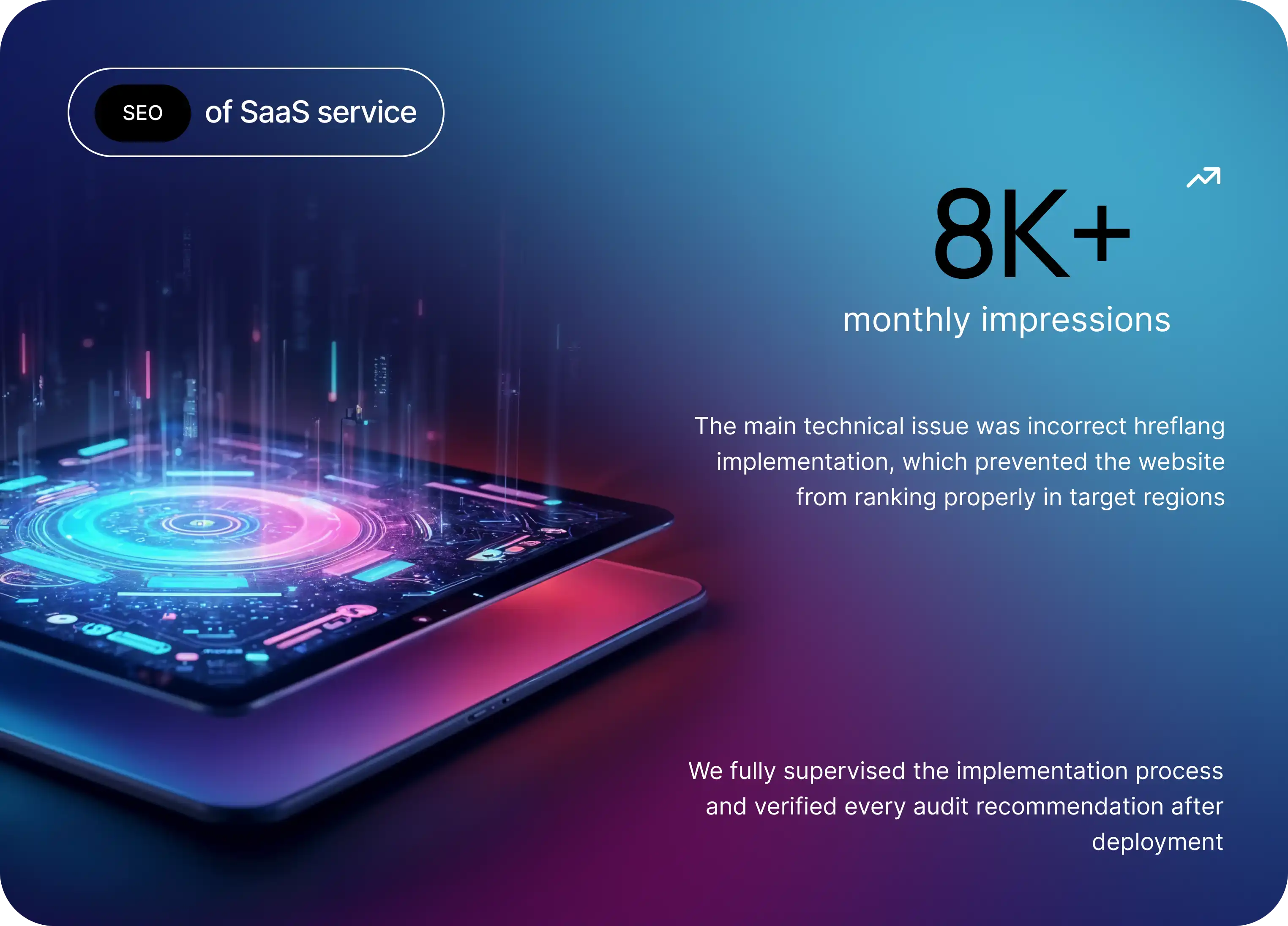
SaaS SEO Case Study: Promoting a SaaS Service Internationally
SaaS
SaaS
SaaS SEO case study: how a full technical audit, hreflang setup, and a steady backlink strategy helped an international SaaS service grow in Norway, the US, and the UK.
Case details
/04/
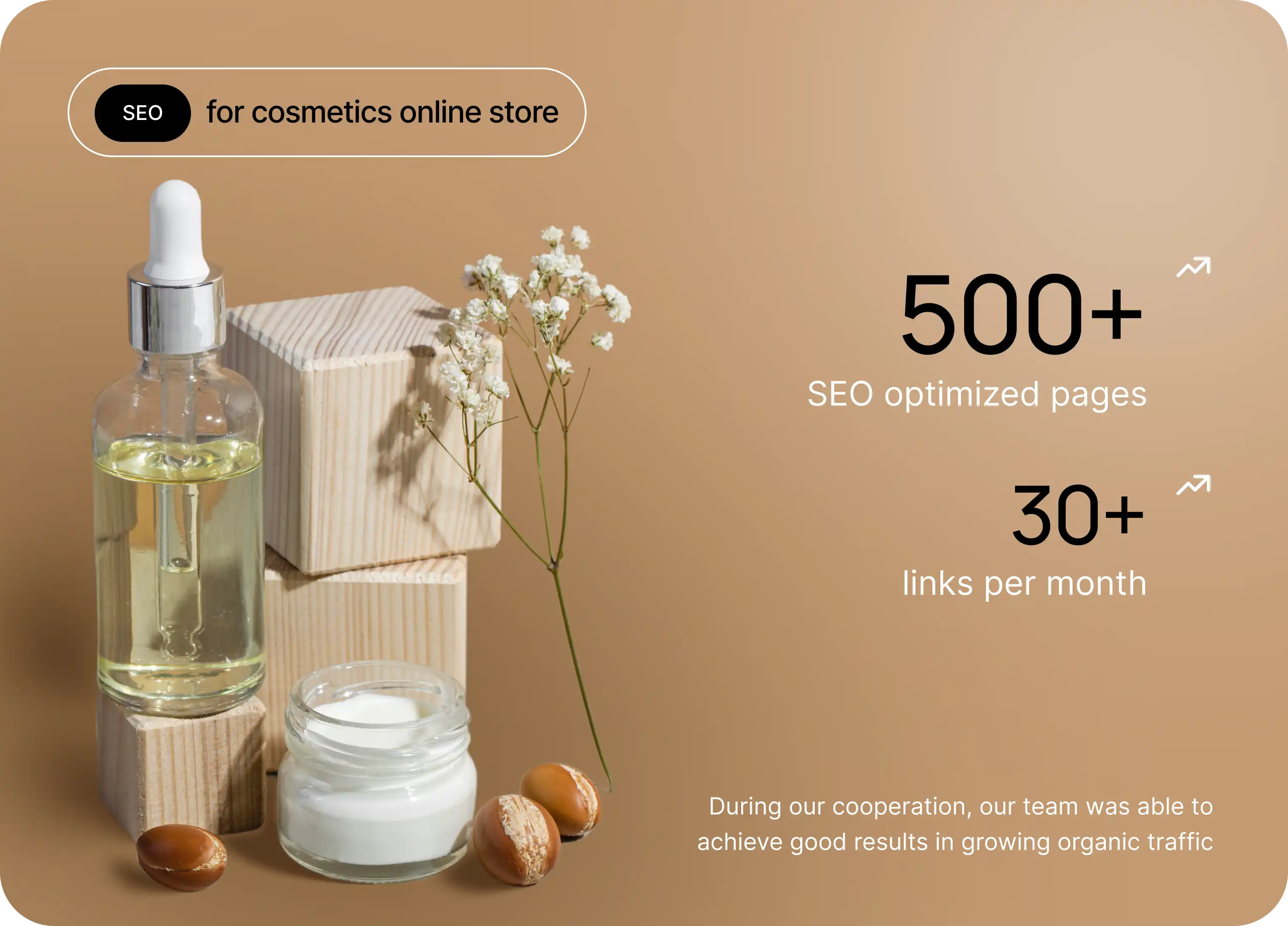
Cosmetics SEO Case Study: An Online Store Success
Cosmetics
Cosmetics
Cosmetics online store SEO case study: technical audit, optimization of 500+ pages, and a steady backlink strategy delivered solid growth in organic traffic.
Case details
/05/
Google Ads Case Study: Auto Accessories Store, 485% ROAS
Auto accessories
Auto accessories
Case details
/06/
Google Ads Case Study: Mattress Online Store, 448% ROAS
Mattresses
Mattresses
Case details
Team

Our experts

At D&Team, we've brought together specialists who help businesses grow online every day. Our SEO experts, PPC specialists, analysts, and developers work as a unified team to deliver a steady stream of targeted traffic and measurable results.
Anastasiia
/PM manager/
Manages projects and coordinates the team to ensure effective strategy execution
Vyacheslav
/SEO Specialist/
SEO expert with 6+ years of experience in digital marketing and online growth
IIryna
/PPC specialist/
Paid traffic specialist managing high-performing advertising campaigns
Oleksii
/Developer/
Develops and improves website functionality, ensuring stable performance
Dmytro
/CEO & Founder/
Defines the agency’s growth strategy and oversees key areas of development
What our clients say

Client testimonials

We value transparency and open feedback. Below are testimonials from companies that chose D&Team as their partner.
We've worked with D&Team for over five years. For me they're not just a contractor or outsourcing - they're my team, just in a different office. Highly recommend.
Kareryna
/Marketer at Alfatech/
Our requirements change - and D&Team changes right along with us; we've found a reliable partner we trust.
Oleh
/Founder of Modulex/
In two years D&Team brought 80%+ of our keywords into the top and set up our ads effectively - highly recommend.
Yuliia
/Director of Versal beauty salon/
Very talented and experienced guys. I enjoyed working with them. Their communication was top-notch, they met all deadlines, and their skills were quite strong. We will continue to work with D&Team. I recommend them if you need an expert in Google CPC and SEO.
Aram Karapetyan
/CEO nftdroops/
I have been working with this team for a long time and am completely satisfied with their work. During our collaboration, they have helped take the website to a new level. I recommend the D&Team for collaboration.
Olga
/Shop owner/
A professional team with an honest and transparent approach to work. During our cooperation, we received many useful recommendations and clear explanations regarding the website’s development. Their expertise and responsibility for results are clearly noticeable.
Fabio
/IT manager/
D&Team are good SEO specialists. They did a good technical SEO audit of the site and turned it in on time. I recommend their cooperation.
Vlad
/Developer/

We use
only proven tools

Frequently asked questions

Below you'll find answers to the most common questions worth reviewing before we start working together
Is it true that Webflow is better for SEO than WordPress?

Technically Webflow has the edge: clean semantic code, speed on Cloudflare Enterprise out of the box, minimum overhead scripts. But the technical edge isn't a guarantee of results. The platform that wins is the one where the SEO strategy is fully executed. WordPress gives more flexibility and plugins, Webflow gives cleaner code. Both can deliver top results with the right approach.

Is it worth migrating from WordPress to Webflow for SEO?

Not worth moving just for SEO. If the WordPress site is stable with solid rankings, migration brings a short-term traffic dip that takes 4-6 weeks to recover from. Webflow makes sense when you need better design, more efficient content management, or you don't have a technical team to maintain WordPress. SEO will recover in both cases, but the migration costs money and time.

How do you work with the CMS items limit in Webflow?

The starter plan gives 100 items per collection, the business plan - 10,000. For projects that hit the 100 cap, the only path is a plan upgrade. For projects with 10,000+ items (large catalogs, portals) Webflow technically isn't a fit and you have to consider other platforms. In the audit we tell you straight whether the business plan will cover your project for the next 2-3 years.

How do you configure Webflow Localization for SEO?

Localization automatically generates hreflang and the URL structure for language versions. But you have to control: the completeness of CMS Collections translation, geo targeting setup through Search Console, content uniqueness for each market. Separately we make sure Localization doesn't create cross-language cannibalization through duplicated meta tags. Often it has to be patched up through custom code.

Can complex Schema.org markup be implemented on Webflow?

Yes. Baseline Schema.org (Article, Product, Organization) is handled through the built-in SEO settings. Extended types (FAQ, HowTo, BreadcrumbList, Review) - through custom code in head or a JavaScript snippet before closing body. Dynamic schema parameters (price or reviews, for example) we handle through Webflow variables in the code. This closes the gap between the platform's baseline and complex SEO requirements.

How do you work with 301 redirects in Webflow?

Webflow supports 301 redirects through the admin panel (Project Settings - Hosting - 301 Redirects). You can add up to 1,000 redirects on the starter plan. For large-scale migrations (thousands of URLs) it's better to handle redirects through the CDN at the Cloudflare level. People often skip this when migrating from other platforms - redirects need to be set up before the site is moved.

What budget should we plan for Webflow SEO?

Webflow sites are usually smaller in scope than big ecommerce, so starting budgets are lower. But custom code for advanced SEO tasks and CMS Collections organization require extra development hours. In the initial consultation we discuss your goals and the scope of work, and after the audit we give a concrete range with a breakdown of every cost line.

When will a Webflow site start getting organic traffic?

Technical fixes show up in the first 3-4 weeks - speed, corrected meta tags, new Schema.org. The first ranking shifts come around weeks 8-10. Systematic traffic growth starts from month 4-6. Agency and SaaS sites on Webflow often show results faster than stores because the niche is less competitive and needs less link equity.

Does it make sense to keep paid ads running alongside SEO?

Yes, this is a workable combination. On most Webflow projects ads are already the main customer acquisition channel - SEO joins in as an additional one with a compounding effect. For agencies and SaaS on Webflow we often see organic taking on a large share of the leads after 6-9 months, after which paid ads can be optimized for narrower segments or promotional campaigns.

Which SEO tools integrate with Webflow and how?

Webflow supports Google Analytics 4, Google Search Console, Google Tag Manager, Meta Pixel, and Hotjar through standard project settings. For more advanced tasks (Ahrefs API, Looker Studio, custom conversion tracking events) we use custom code injection - dropping the required JavaScript into head or before the closing body. Setting up external tools is one of the first technical steps we take at the start of a project.

Contact
Contact us
Tell us about your project - we’ll propose a growth strategy
We’ll get back to you as soon as possible:
Anastasia
/Project manager/
Choose your preferred way to connect:
Send us a message:
Message sent successfully